

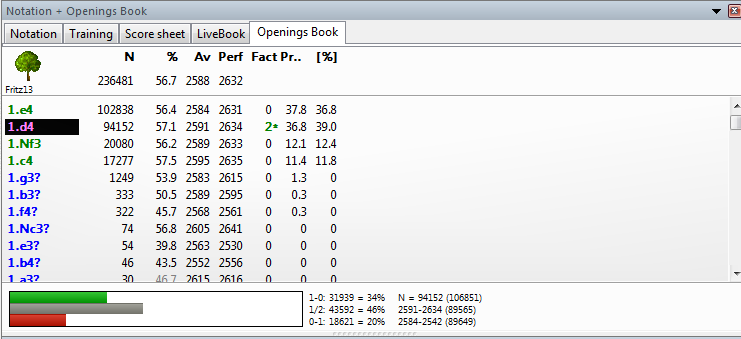
When the opening tree stops and your moves are not there yet
The Core Problem (What’s Really Happening)
In Fritz, the Opening Tree is not magical.
It only shows moves that already exist in its underlying database or opening book.
So when:
You reach move X
And the Opening Tree suddenly stops
And your desired continuation does not appear
👉 It means that line does not exist yet in the tree.
The good news?
You can manually inject that line and force Fritz / ChessBase to learn it.
Important Distinction (Tree vs Book)
Before we proceed, clarity matters:
Opening Tree → statistical view (games-based)
Opening Book (.ctg) → move-selection engine logic
To make a move appear in the Opening Tree, it must exist in at least one stored game.
Method 1: The Correct & Clean Way (Recommended)
Add the Missing Line by Creating a Game Manually
This is the proper way ChessBase was designed to work.
Step 1: Create a New Game with the Missing Line
Open Fritz
Click New Game
Play the opening manually:
Enter all moves up to and beyond where the tree stops
Include the new move you want to appear
💡 You only need one game for the line to exist.
Step 2: Save the Game into a Database
When done, click Save Game
Save it into:
Your main opening database, or
A dedicated “Opening Experiments” database
Name it clearly (example):
Experimental Line – Najdorf h4 novelty
Step 3: Rebuild the Opening Tree
Open the database containing the new game
Go to Tools → Opening Tree
Let Fritz recalculate the tree
✅ The new move now appears as a legal branch.
Even with 1 game, the tree will show:
Move
Game count = 1
Statistics (basic)
Method 2: Use a Mini PGN Injection (Fast & Efficient)
If you prefer speed:
Create a PGN file with:
Exactly one game
Only the opening line (can end early)
Import that PGN into your database
Refresh the Opening Tree
This is how many advanced users force theoretical novelties into the tree.
Method 3: Strengthening the Line (So It Doesn’t Look Weak)
A single game works—but looks thin.
To make the line look serious:
Duplicate the game
Slightly alter move orders (transpositions)
Save multiple versions
This increases:
Game count
Statistical weight
Tree credibility
Method 4: Add the Line to the Opening Book (Optional but Powerful)
If you want Fritz to play the line automatically:
Load your
.ctgbookUse Add Games to Book
Select your injected games
Rebuild the book
Now:
Tree shows the line
Engine actively plays it
Why Fritz Doesn’t Allow “Manual Tree Editing”
You might ask:
“Why can’t I just right-click and add a move?”
Because:
The Opening Tree is derived, not editable
It reflects games, not opinions
ChessBase enforces this to prevent:
Fake statistics
Artificial theory pollution
Ironically, this makes your method more powerful, because:
One game = one new universe
Common Mistakes to Avoid
🚫 Waiting for online databases to update
🚫 Thinking the engine will invent tree moves
🚫 Adding the move only in analysis (analysis ≠ tree)
🚫 Forgetting to save the game
Mental Model (Think Like This)
Tree = memory
Game = neuron
Saving a game = learning
No game → no memory → no branch.
Final Thoughts
If an opening line does not exist, Fritz is not blocking you.
It’s asking you to create theory.
Every novelty—human or engine—starts with one saved game.
That’s how:
New openings are born
Private repertoires are built
Engines are guided into unexplored territory
SEO Tags
Tags: Fritz opening tree, add opening line ChessBase, opening tree missing moves, chess opening database
Hashtags: #FritzChess #ChessBase #OpeningTree #ChessTheory #ChessEngines


No comments:
Post a Comment
Note: Only a member of this blog may post a comment.